
FairPlay App — Free APK Plus Six Install Errors Explained
Three taps on Android: Download APK, Allow install, Log in. On an iPhone there is no file at all, just a Safari shortcut that opens full-screen. Whichever phone you carry, your existing FairPlay user ID and password sign in and the wallet balance matches the website to the rupee. Only the first Android install asks for a permission.
FairPlay App Login — Fast Entry with Your Verified ID
Already installed? Type your FairPlay user ID or the 10-digit mobile you registered with, then the password. Nothing new to set up for the app.
No FairPlay ID yet: the form takes a mobile number, sends a 6-digit OTP, then lets you pick a user ID and password. About a minute. The same details work in the FairPlay app, in Chrome and on every mirror.
FairPlay App Download — 3 Official Install Steps on Android
Your phone treats the FairPlay APK the way it treats a PDF someone sent you: a file you fetched on your own. That single fact explains every warning below. A store app arrives pre-approved; this one has to be let in by you, once, and Android is noisy about it on purpose. Search results for the FairPlay app often point at mirrors of mirrors, which is why the download should start from the address support hands you.
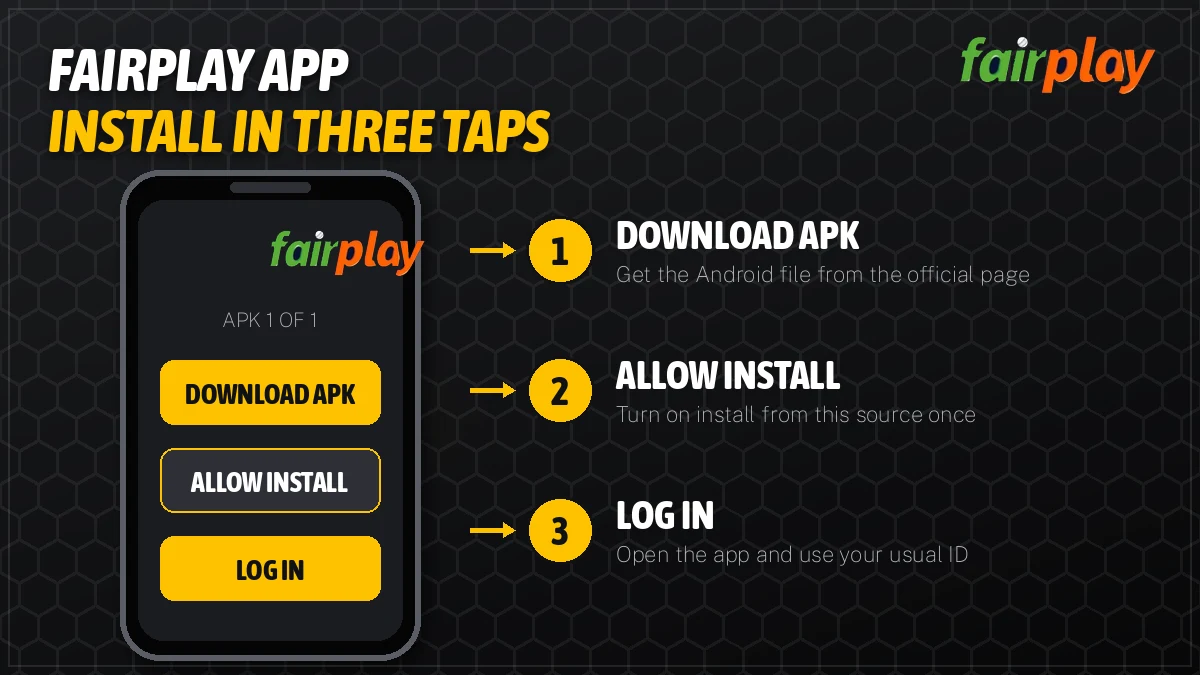
- Download APKOpen the address support gave you, tap the app download link, let Chrome save the file.
- Allow installAndroid shows a warning. Open settings from that prompt and allow installs from Chrome, once.
- Log inOpen the FairPlay icon, enter user ID or mobile plus password. Balance shows at the top.
Step 1 — the download tap
Load the FairPlay address you got from support in Chrome and tap its app download link; an .apk file lands in Downloads. Chrome may say the file type can harm your device. That line appears for every APK on earth, so tap Download anyway, but only if the address bar shows the address support gave you and not a lookalike that came up in search.
Step 2 — the one-time permission
Tap the finished download. On Android 8 and newer the phone stops and says Chrome is not allowed to install unknown apps; the prompt carries a Settings shortcut. Flip the switch for Chrome, press back, and the installer comes up. This is a per-source setting, which means you are trusting Chrome, not every file on the phone. You can switch it off again once the FairPlay app is in place (plenty of people forget, and the the switch just sits there).
Step 3 — first launch
The icon lands in the app drawer. First open shows the FairPlay login screen, the same one the website uses, and your user ID or mobile plus password gets you in. Forgot the password? Reset goes through the registered mobile, and the FairPlay login steps page covers the OTP route and the reset in full.
When Chrome loses the file
Sometimes the download finishes and nothing pops up. The file is still there. Open the Files app (or My Files on Samsung), go to Downloads, and sort by date; the FairPlay APK will be at the top. Tapping it from there starts the same installer, although Android will now ask to allow the file manager rather than Chrome. Allow that one instead. Check two things before you tap install: the file name should end in .apk, not .apk.zip or .bin, and the size Chrome showed should roughly match what the file manager shows. A file of a few kilobytes is a failed download, not an app.
Samsung, Xiaomi, Vivo and Realme word the permission screen differently. Some call it Install unknown apps, some say Allow from this source. Same switch. On Xiaomi phones a second scan screen can appear after the install button; let it finish rather than cancelling halfway.
FairPlay App iOS and Android — Verified Routes Side by Side
Two phones, two routes, one account. Apple does not let an APK anywhere near an iPhone, so the FairPlay app on iOS is a home-screen web app: Safari saves the FairPlay address as an icon, and it opens full-screen without the browser bar. It behaves like an app. It is not in the App Store, and a listing that claims to be FairPlay there deserves suspicion.
| Point | FairPlay on Android | FairPlay on iPhone |
|---|---|---|
| Install route | APK file from the official FairPlay address, then allow install from Chrome | Safari, Share, Add to Home Screen |
| File size | Small; check the size Chrome shows before you tap install | No file at all, only a saved shortcut |
| Permissions asked | One: install from this source | None |
| Updates | Download the newer APK and install it over the old one | Loads the current site every time it opens |
| Login | Same FairPlay user ID or mobile plus password | Same FairPlay user ID or mobile plus password |
| Wallet | Same balance as the website and every mirror | Same balance as the website and every mirror |
| If an address is blocked | Ask support for the working one; the app may need the new link | Delete the icon, add the new address the same way |
Adding FairPlay to an iPhone home screen
It has to be Safari. Chrome on iOS hides the option in some versions, and third-party browsers mostly save a bookmark instead of a full-screen icon. Open the FairPlay address, tap the Share square at the bottom, scroll the sheet to Add to Home Screen, rename the icon if you want, tap Add. Roughly twenty seconds. The first launch asks you to log in; after that Safari keeps the session the way it would on the website.
One quirk. Because the icon points at a single address, a blocked domain breaks the icon too. The fix takes less time than the original setup did: remove the old icon, open the new FairPlay address from support, add it again.
Inside the FairPlay Live App — Live Cricket, Casino and One Wallet
After login the FairPlay app is the full site in a tighter frame. Nothing is trimmed for mobile, and nothing sits behind a separate app account.
- 1 IDapp, browser and mirrors
- 3 cricket marketsmatch odds, bookmaker, fancy
- 15 min+typical withdrawal window after KYC
- 18+only, every route
The first tab most people open in the FairPlay app is the IPL one. Exchange odds, bookmaker and fancy lines all fit on a phone screen, and the in-play numbers refresh without a pull-down. Kabaddi, tennis and football hide one tap further along the sports row. How each cricket market settles is a longer story than an install page should tell; the FairPlay cricket markets page has it, in more detail then you need before your first bet.
On a 6-inch screen the back and lay columns sit side by side under each runner, laid out the same way as on the desktop site. Tap a rate and a bet slip opens beneath the market with a stake box. Type the amount, check the rate has not moved, confirm. During a tight chase rates can shift between the tap and the confirm, so a slip that gets rejected is normally a moved price, not a fault in the FairPlay app.
Swipe to the casino tab and the live dealer tables load: roulette, baccarat, teen patti, andar bahar, dragon tiger, lucky 7 and blackjack from studios such as Evolution and Ezugi. Aviator and the other crash games have their own tiles. On a mid-range phone the live video is the heaviest thing the FairPlay app does, so a weak signal shows up there first, long before the odds screen stutters.
App or browser: which one to open
Both reach the same account, so this is about habit, not features. The FairPlay app keeps you logged in between sessions, opens straight to the lobby from one icon, and skips the tab clutter that builds up in Chrome during a long match day. The browser needs nothing installed, which suits a work phone or a borrowed one. On a shared phone, log out before handing it back; the app remembers the session until you do. People who switch between the two a lot tend to keep the app for cricket and use Chrome when a new address from support has not reached the app yet.
The cashier is identical to the one on the website. Deposits run through UPI, IMPS or bank transfer, with a low minimum that the cashier displays. Withdrawals go only to a bank account or UPI ID in your own name, after KYC, and usually clear within fifteen minutes to a few hours; first payouts, bank holidays and pending KYC stretch that. Full timing lives on the FairPlay withdrawal time page. Offers change often, so any bonus code is entered in the same cashier or given by support, with wagering terms attached.
FairPlay Live APK Won't Install? Fast Fixes, Error by Error
Most install failures fall into six messages. Read the exact words on screen, find the row, do what it says. Retrying the same tap five times fixes none of them.
| What the phone says | What it means | What to do |
|---|---|---|
| Install blocked: Chrome has no permission for unknown apps | Step 2 permission still off | Tap Settings on that prompt, allow Chrome (or your file manager), go back |
| Blocked by Play Protect | Google scans any app not from the Play Store and flags it by default | Tap More details, then Install anyway, only for a file from the official FairPlay address |
| App not installed | An older FairPlay APK with a different signature is already on the phone, or storage is full | Uninstall the old app, free some space, install the fresh file |
| There was a problem parsing the package | The download broke midway | Delete the file, download it again on steady Wi-Fi or mobile data |
| Download stuck or file shows 0 KB | The address is blocked on your network, or Chrome paused the file | Ask support for the working FairPlay address, then retry |
| App opens but the page will not load | The domain inside the app was blocked after you installed | Get the current APK or open the new address in the browser |
A typical case. Someone on a two-year-old Redmi downloads the FairPlay APK during the second innings of an IPL game, taps install, gets App not installed, and tries four more times. The cause was an older copy from last season sitting in the app list with a different signing key. Uninstalling it took ten seconds. The balance was untouched, because the wallet belongs to the FairPlay ID on the server and not to anything stored on the phone.
That last point matters more than it sounds, so here it is again in plain terms: deleting the FairPlay app deletes an icon. It does not delete money, bet history or the account. Its safe to uninstall and reinstall as often as a stubborn phone needs.
What to send support if nothing on this list fits
Support can only fix what it can see. A message that says the app is not working gets a reply asking for details, and that round trip costs time. Send it all in one go instead: the phone brand and model, the exact words of the error (a screenshot is better), the address you downloaded from, and whether the FairPlay website opens in Chrome on the same connection. With those four details the answer is usually a new link or a single setting, sent back in one reply. If the website loads but the app does not, say so first, because that points straight at a blocked domain inside the build.
If the FairPlay app opens and rejects the password, the problem is the account, not the install. Wrong mobile format and old passwords cause most of it. The FairPlay sign-in help lists each login error; for a brand-new account the FairPlay register page explains the OTP form field by field. Got your ID on WhatsApp instead? A password change on first sign-in is normal there, and the FairPlay ID page explains why.
FairPlay Apk Download Updates — Secure Refresh When an Address Moves
Months after install, the FairPlay app can open to a blank screen with nothing changed on the phone. The cause usually sits outside it. Indian networks block betting domains every so often, and the address inside that build was one of them. FairPlay keeps several addresses running for exactly this (pro, global, club, live, 365, 247, 24, online), and your ID plus balance carry across all of them; the FairPlay Pro address page tracks how those mirrors relate.
Whether your copy needs replacing depends on the build. Some switch addresses quietly and never show a problem. Others just stop loading until a fresh FairPlay APK goes on. Hard to say which one you have until the day it happens.
- Test the FairPlay site in Chrome first. If it fails there too, the domain is gone, and the phone is fine.
- Text +91 81097 11726; the reply carries today's working FairPlay link. Load it in Chrome and grab the APK again.
- Install over the old copy. If Android refuses, uninstall first; the account is safe either way.
- Log in with the same user ID or mobile and password.
Updating takes less time than the first install, because the permission from step 2 is usually still on. Do not pick up a FairPlay APK from a Telegram forward or a file-sharing site to save a minute. A copied file can be old, broken or tampered with, and there is no way to tell from the icon. The address from support is slower by maybe a minute and far safer then any shortcut.
Removing the FairPlay app cleanly
Long-press the icon, choose App info, then Uninstall. That is all Android needs. If you want the phone back to its original state, go into the special app access settings and switch off install unknown apps for Chrome as well, since the permission stays on after the app is gone. The account itself is untouched by any of this; closing a FairPlay ID is a request to support, not something an uninstall does.
On iPhone there is nothing to update. The home-screen icon loads whatever the address serves each time, so a new feature on the FairPlay site shows up there the same day.
FairPlay App Download Terms — Trusted Answers in Two Columns
What people search before installing FairPlay
- FairPlay app download for Android: an APK from the official address, not the Play Store.
- FairPlay live app download and FairPlay live apk: the same file, named after the live address.
- FairPlay apk download latest version: whatever the current address serves today.
- FairPlay app iOS: Safari, Share, Add to Home Screen.
- FairPlay live app: one login with the site, one wallet.
- FairPlay not working in the app: usually a blocked address, fixed by the new link from support.
How the FairPlay app ties into the account
The FairPlay app uses your FairPlay ID and password, or the registered mobile, exactly as the website does. FairPlay login, FairPlay register and a new FairPlay betting ID all work from inside the app, and a FairPlay mirror such as FairPlay 365, FairPlay 247 or FairPlay global opens the same account with the same balance.
Inside it you get FairPlay cricket and IPL markets with back and lay, the FairPlay live casino with teen patti, andar bahar, dragon tiger and roulette, FairPlay Aviator, plus the cashier for FairPlay deposit by UPI and FairPlay withdrawal after KYC. FairPlay customer care on WhatsApp answers install questions too.
FairPlay App Questions — Free, Safe and Verified Answers
Is the FairPlay app free to use?
Yes. The FairPlay app costs nothing to download or install, on Android or iPhone. You only move money when you choose to deposit through the cashier, using UPI, IMPS or bank transfer with a low minimum shown there. There is no subscription and no paid version of the app.
How do I download the FairPlay app on Android?
Three moves: save the APK, permit Chrome, sign in. The file comes from the FairPlay address support confirms, since the Play Store does not carry it. Android pauses on the first try and shows a Settings shortcut where Chrome gets permission. After that the FairPlay icon opens to the login screen.
Is there a FairPlay app for iOS?
There is no App Store build. On iPhone the FairPlay app is a home-screen web app: open the official address in Safari, tap Share, choose Add to Home Screen and tap Add. It opens full-screen and uses the same FairPlay login and wallet as Android.
Why does my phone block the FairPlay APK install?
The block is Android default behaviour for files, not a verdict on FairPlay. The warning has a Settings shortcut; switch Chrome on there and return to the installer. A second Play Protect screen may follow, where Install anyway is fine for a file taken from the address support confirmed.
Is the FairPlay app safe?
The app is as safe as the file you install. Take the APK only from the official FairPlay address that support confirms, never from forwards or file-sharing sites. Withdrawals go only to a same-name bank or UPI after KYC. FairPlay is 18+ only, and rules differ by state.
How do I update the FairPlay live APK?
Grab the fresh file from whichever FairPlay address works today and tap install on top of the existing copy. Android sometimes rejects that because the signature changed; remove the old copy and try again. Money and history sit with the ID on the server. The iPhone icon never needs this step.
Can I use the same FairPlay ID on the app and the website?
Yes, it is one account everywhere. A FairPlay ID made through the signup form or over WhatsApp opens the Android build, the Safari icon on iPhone, desktop Chrome and each mirror such as pro or global. Balance and bet history follow the ID rather than the device, so the app needs no separate registration.
Searches that bring people to this FairPlay app page
- fairplay app download
- fairplay live apk
- fairplay apk download latest version
- fairplay app ios
- fairplay live app download
- fairplay app kaise download kare
- fairplay apk install nahi ho raha
- fairplay live app login
- fairplay app update
- fairplay app safe hai
- fairplay app for android
More FairPlay pages